Genjutsu AI Video Generator
Recreate videos with motion transfer and object swap using your own photos
Data verified Oct 30, 2026
Score
- Price
- From $8.3/month (Starter, billed yearly)
- Try it free
- Free plan
- Best for
- Short-form video creators
- Platforms
- Web
Editorial Verdict
AI-researched, not hands-on testedGenjutsu AI Video Generator is a browser-based motion transfer and object swap tool that recreates a reference video using uploaded photos of people, pets, or products. It suits short-form content creators and small marketing teams who want to recast a clip or feature a different product without reshooting. The free tier is watermarked and the site itself notes that faces, clothing, product shapes, and background details can shift between frames, so results need review before sharing. Pricing scales from a $8.3/month Starter plan to a $49.9/month Business plan on yearly billing, all drawing from a shared credit balance across image, video, and motion transfer jobs.
Reviewed by AIToolPundit Editorial Team · last verified October 2026
About Genjutsu AI Video Generator
Genjutsu AI Video Generator is a web workspace that recreates existing videos using motion transfer and object swap. Users pick a preset or upload a reference clip of 4 to 30 seconds, add up to 30 photos of people, pets, or products, then generate a new version where the reference clip guides the action and the photos guide the look. The service runs on multiple models including Seedance 2.5, Kling 2.6 and 3.0 Motion Control, Wan 2.2 Animate Move and Animate Replace, GPT Image 2, and Nano Banana Pro, with image output up to 4K and video output up to HD depending on the model.
Pricing uses a single credit balance shared across images, videos, and motion transfer. A free Basic tier gives 18 signup credits with watermarked previews, enough for up to three images or one video. Paid yearly plans start at $8.3/month on Starter (2,400 credits/year) and scale to Pro at $30/month (21,600 credits/year) and Business at $49.9/month (48,000 credits/year). Weekly check-ins can add up to 60 additional credits across the reward cycle. Subscription credits expire each period; one-time credits do not. Refund requests are accepted within 72 hours of payment.
Screenshots
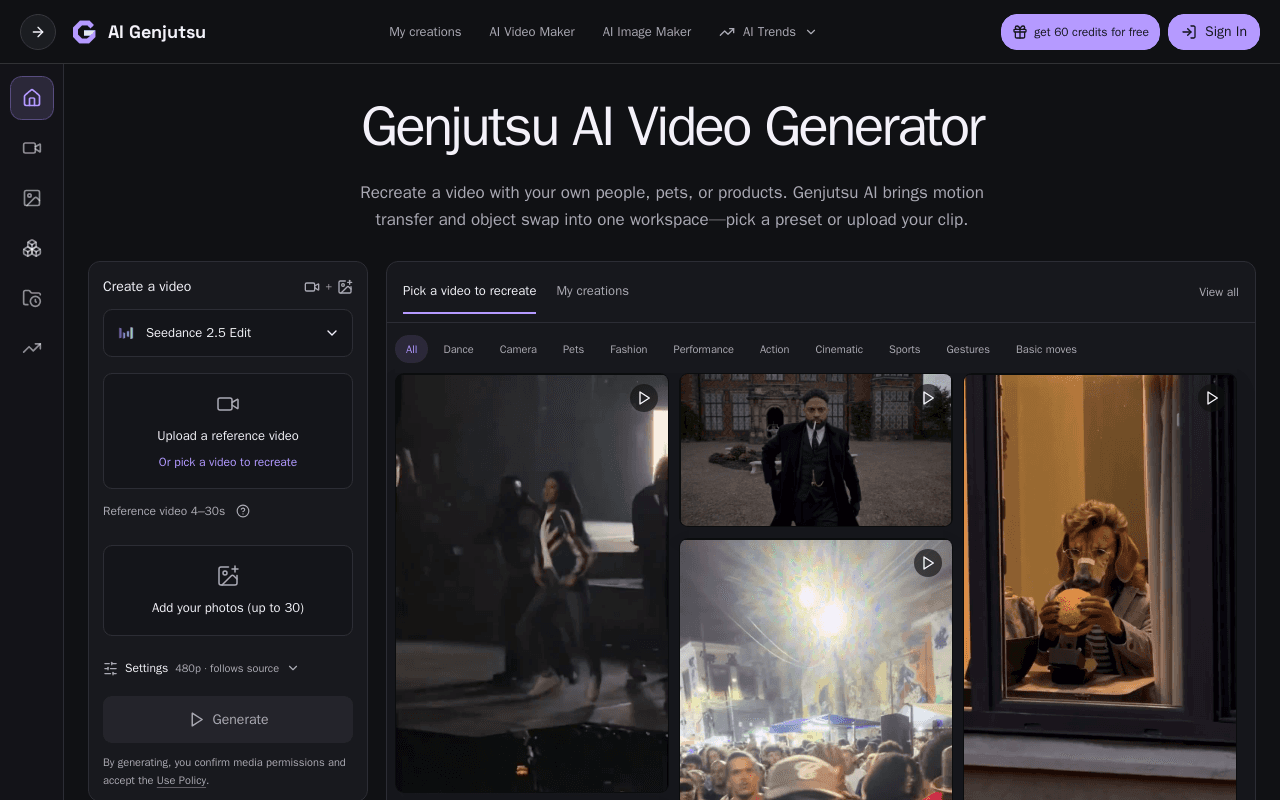
Commonly Cited Strengths & Limitations
Strengths
- Free Basic tier with 18 signup credits lets new users test the workspace before paying
- Multiple video and image models available from one shared credit balance
- Presets and templates mean no text prompt is required to start
Limitations
- Free Basic plan only produces watermarked previews; watermark-free downloads require a paid plan
- Subscription credits expire at the end of each billing period
- Site states exact reproduction of faces, clothing, product shapes, and backgrounds is not guaranteed
Common Use Cases
- Recreate a trending dance or performance video with a different cast using motion transfer
- Swap a product, vehicle, or outfit into an existing scene while keeping the original camera and timing
- Generate a pet performance clip from a motion template and a photo of the animal
Details
- Pricing Model
- Freemium
- Starting Price
- From $8.3/month (Starter, billed yearly)
- Platforms
- Web
- Category
- AI Image & Video Generation
Who is Genjutsu AI Video Generator for?
Short-form video creators
People making trend-style clips who want to recast a dance, gesture, or scene with their own likeness or a chosen character.
Small business and product marketers
Teams who want to feature their own product, vehicle, or prop inside an existing reference scene without reshooting the clip.
Frequently Asked Questions
Is Genjutsu AI Video Generator free?
Genjutsu AI Video Generator offers a free plan, with paid plans starting at From $8.3/month (Starter, billed yearly).
Does Genjutsu AI Video Generator offer a free trial?
Yes, Genjutsu AI Video Generator offers a free trial.
Does Genjutsu AI Video Generator have an API?
Genjutsu AI Video Generator does not currently offer a public API.
What platforms does Genjutsu AI Video Generator support?
Genjutsu AI Video Generator is available on Web.
What are the downsides of Genjutsu AI Video Generator?
Free Basic plan only produces watermarked previews; watermark-free downloads require a paid plan Also, Subscription credits expire at the end of each billing period
Who is Genjutsu AI Video Generator best for?
Genjutsu AI Video Generator is best suited for Short-form video creators, Small business and product marketers.
What can I use Genjutsu AI Video Generator for?
Common uses for Genjutsu AI Video Generator include recreate a trending dance or performance video with a different cast using motion transfer, swap a product, vehicle, or outfit into an existing scene while keeping the original camera and timing, generate a pet performance clip from a motion template and a photo of the animal.
How does Genjutsu AI Video Generator compare to InfiniteArt.ai?
Genjutsu AI Video Generator and InfiniteArt.ai are both used for ai image & video generation -- specifically video editing tools. See the full side-by-side comparison for pricing and feature differences.
Key Features
- Motion transferUses a reference video to drive the action in a new clip, so a dance, gesture, or performance can be recast with uploaded photos of people or pets.
- Object swapReplaces products, vehicles, or props in an existing scene by combining a source clip with replacement photos and a custom prompt.
- Preset libraryReady-made community presets pair a clip with starting references and instructions for duets, crowd scenes, pet performances, and vehicle shots.
- Multi-model workspaceSupports Seedance 2.0 and 2.5, Kling 2.6 and 3.0 Motion Control, Wan 2.2 Animate Move and Animate Replace, GPT Image 2, and Nano Banana Pro from one credit balance.
- Shared credit systemA single credit balance covers image generation, video generation, and motion transfer; one-time credits never expire while subscription credits reset each period.
- Generation historySigned-in users can view and reopen their creations in My creations and download watermark-free versions on paid plans.
Technical Details
- Free Trial
- Yes
- Free Plan
- Available
Official Pricing
Genjutsu AI Video Generator's published plans · verified Oct 30, 2026
Basic
$0
- 18 one-time signup credits
- Up to 3 images or 1 video
- Watermarked previews and downloads
- Generation history included
Starter
$8.3/month ($100 charged yearly)/yr
- 2,400 credits per year
- Up to 400 images or 133 videos
- Watermark-free downloads
- Generation history in account
Pro
$30/month ($360 charged yearly)/yr
- 21,600 credits per year
- Up to 3,600 images or 1,200 videos
- Credits usable across image and video models
- Watermark-free downloads
Business
$49.9/month ($599 charged yearly)/yr
- 48,000 credits per year
- Up to 8,000 images or 2,666 videos
- Credits usable across image and video models
- Watermark-free downloads
Pricing shown above is sourced from Genjutsu AI Video Generator's own published plans as of Oct 30, 2026 and can change at any time -- confirm current pricing on Genjutsu AI Video Generator's own site before purchasing.
Full Genjutsu AI Video Generator pricing breakdown, free plan and cheaper alternatives →
Real Pricing from Verified Users
See what people actually pay for Genjutsu AI Video Generator
Reviews
0 reviews
No reviews yet. Be the first to share your experience!
Switching Stories
Real migration experiences with Genjutsu AI Video Generator
Discussion
Ask questions, share tips, or discuss this tool with other users.
No discussion yet. Start the conversation!
Similar tools in AI Image & Video Generation
Other listed tools in AI Image & Video Generation, not reviewed as direct alternatives

AI creative studio for iOS and Mac that turns text into images and animates them into video.
Also Video Editing Tools
- Text-to-image generation
- Generate videos
- Multiple image models

Adobe's all-in-one generative AI creative studio for commercial-safe content
Also Video Editing Tools
- Image Generation
- Video Generation
- Audio Generation
AI dubbing and localization with a full editor to transcribe, translate, caption, and dub in 50+ languages.
Also Video Editing Tools
- Automated dubbing
- Transcription
- Translation

- Seedance 2.5
- Nano Banana Pro
- Higgsfield Genjutsu

AI creative agents that turn one brief into on-brand images, video, copy, slides, and audio
Also Video Editing Tools
- AI Agent
- Brand consistency
- Smart Model Routing

- Video translation and dubbing
- Voice cloning
- Lip-sync
Also used for
People Also Viewed



More in AI Image & Video Generation

All-in-one audio & video editing


Open-source image generation AI