
HiClip
AI video clipping agent that turns one long video into 10+ share-ready short clips.
Data verified Nov 15, 2026
Score
- Try it free
- Free plan
- Best for
- Social Media Marketers
About HiClip
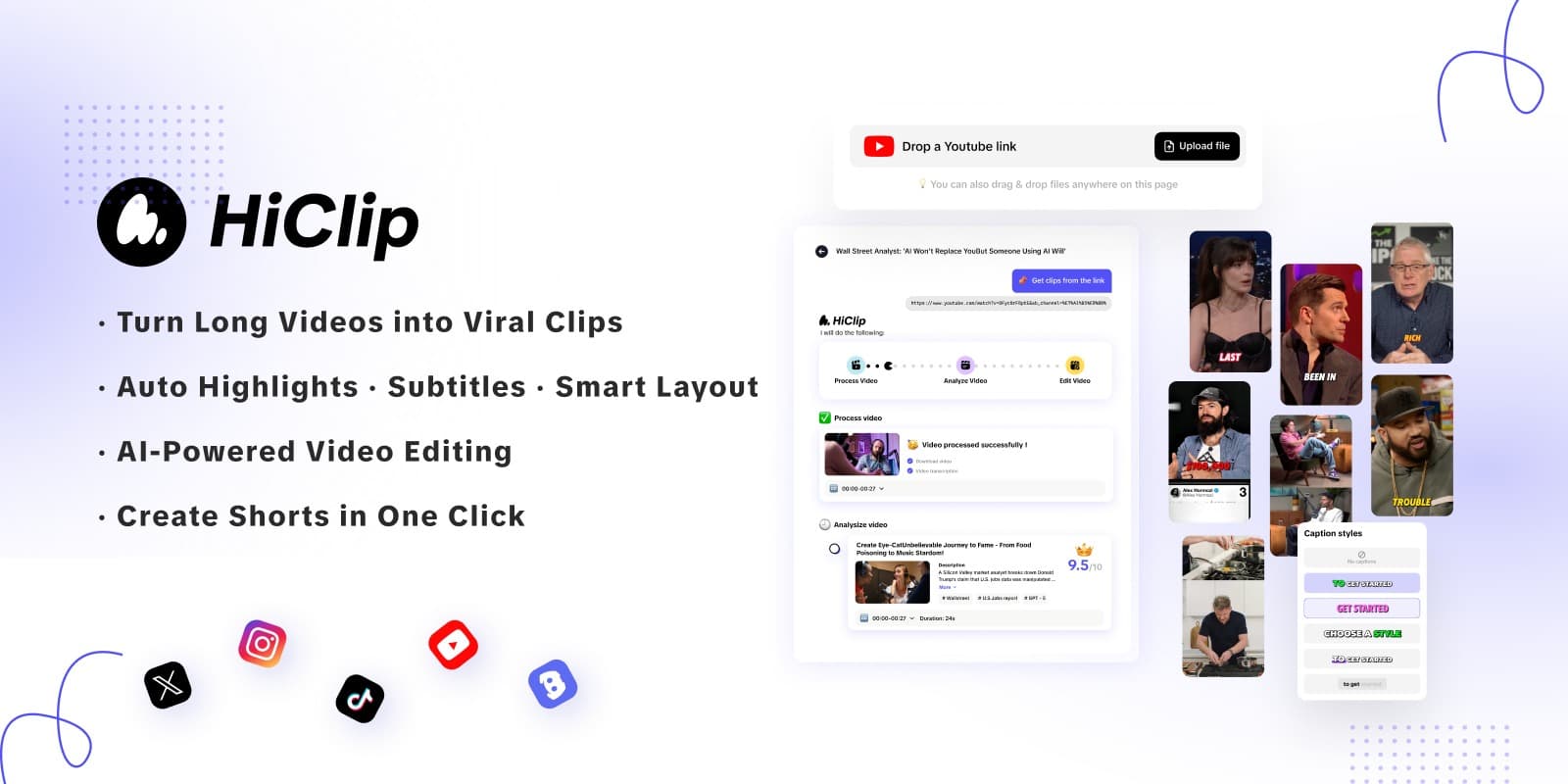
HiClip is an AI-powered video repurposing tool that automatically turns long-form videos into short vertical clips for TikTok, Instagram Reels, and YouTube Shorts, complete with captions and platform-specific reframing. It's aimed at content creators, marketers, and social teams who want to scale short-form output without editing skills. Its main differentiator is a proprietary Context-Aware Analysis that scores visual dynamics, audio cues, and semantic context to surface the most engaging 'hook' moments automatically.
Screenshots
Commonly Cited Strengths & Limitations
Strengths
- Saves 85%+ editing time compared to manual editing
- No editing skills required
- Supports multi-platform reformatting in one click
- Generates 10 highlights in about 20 seconds
Limitations
- Limited manual editing and customization control
- AI doesn't always pick the most relevant highlights, requiring manual adjustment
- Performance issues and unresponsiveness with longer videos
- Free trial reported as misleading — users said they had to buy credits despite 'no credit card' claims
- Very new/recently registered domain, prompting trust caution
Common Use Cases
- Turn long videos into Shorts, Reels, and TikToks
- Repurpose YouTube videos for Instagram Reels
- Automatically edit videos for TikTok
- Add captions and subtitles to videos
- Reframe videos for multiple platforms
Details
- Pricing Model
- Freemium
- Category
- AI Image & Video Generation
Who is HiClip for?
Social Media Marketers
Generate high-converting short clips from long content to drive more shares across TikTok, Reels, and Shorts.
Content Creators
Turn a single long video into 10+ hooked clips without needing editing skills.
Frequently Asked Questions
Is HiClip free?
HiClip offers a free plan.
Does HiClip have an API?
HiClip does not currently offer a public API.
What does HiClip integrate with?
HiClip integrates with YouTube, Vimeo.
Is HiClip cloud-based or self-hosted?
HiClip is offered as a cloud-based (SaaS) deployment.
What are the downsides of HiClip?
Limited manual editing and customization control Also, AI doesn't always pick the most relevant highlights, requiring manual adjustment
Who is HiClip best for?
HiClip is best suited for Social Media Marketers, Content Creators.
What can I use HiClip for?
Common uses for HiClip include turn long videos into shorts, reels, and tiktoks, repurpose youtube videos for instagram reels, automatically edit videos for tiktok, add captions and subtitles to videos.
How does HiClip compare to InfiniteArt.ai?
HiClip and InfiniteArt.ai are both used for ai image & video generation -- specifically video editing tools. See the full side-by-side comparison for pricing and feature differences.
Key Features
- AI ClippingAuto-generates clips and extracts highlights from long videos.
- AI ReframeReframes and auto-crops videos to a 9:16 vertical ratio for any platform.
- AI CaptionAdds subtitles and generates captions with trending hashtag suggestions.
- AI AnalysisProprietary Context-Aware Analysis tracks visual dynamics, audio cues, and semantic context to find engaging moments.
- One-click publishPublishes clips in one click, including auto-posting to Instagram Reels.
- Silence removalDetects audio cues to remove silence from clips.
Integrations
Technical Details
- Deployment
- Cloud
- Target Market
- B2B
- Free Plan
- Available
Real Pricing from Verified Users
See what people actually pay for HiClip
Reviews
0 reviews
No reviews yet. Be the first to share your experience!
Switching Stories
Real migration experiences with HiClip
Discussion
Ask questions, share tips, or discuss this tool with other users.
No discussion yet. Start the conversation!
Similar tools in AI Image & Video Generation
Other listed tools in AI Image & Video Generation, not reviewed as direct alternatives

AI creative studio for iOS and Mac that turns text into images and animates them into video.
Also Video Editing Tools
- Text-to-image generation
- Generate videos
- Multiple image models
AI dubbing and localization with a full editor to transcribe, translate, caption, and dub in 50+ languages.
Also Video Editing Tools
- Automated dubbing
- Transcription
- Translation

- Seedance 2.5
- Nano Banana Pro
- Higgsfield Genjutsu
- Raya AI agent
- Competitor strategy extraction
- Customer review mining

AI creative agents that turn one brief into on-brand images, video, copy, slides, and audio
Also Video Editing Tools
- AI Agent
- Brand consistency
- Smart Model Routing

- Video translation and dubbing
- Voice cloning
- Lip-sync
Also used for
People Also Viewed



More in AI Image & Video Generation

All-in-one audio & video editing


Open-source image generation AI