Plask
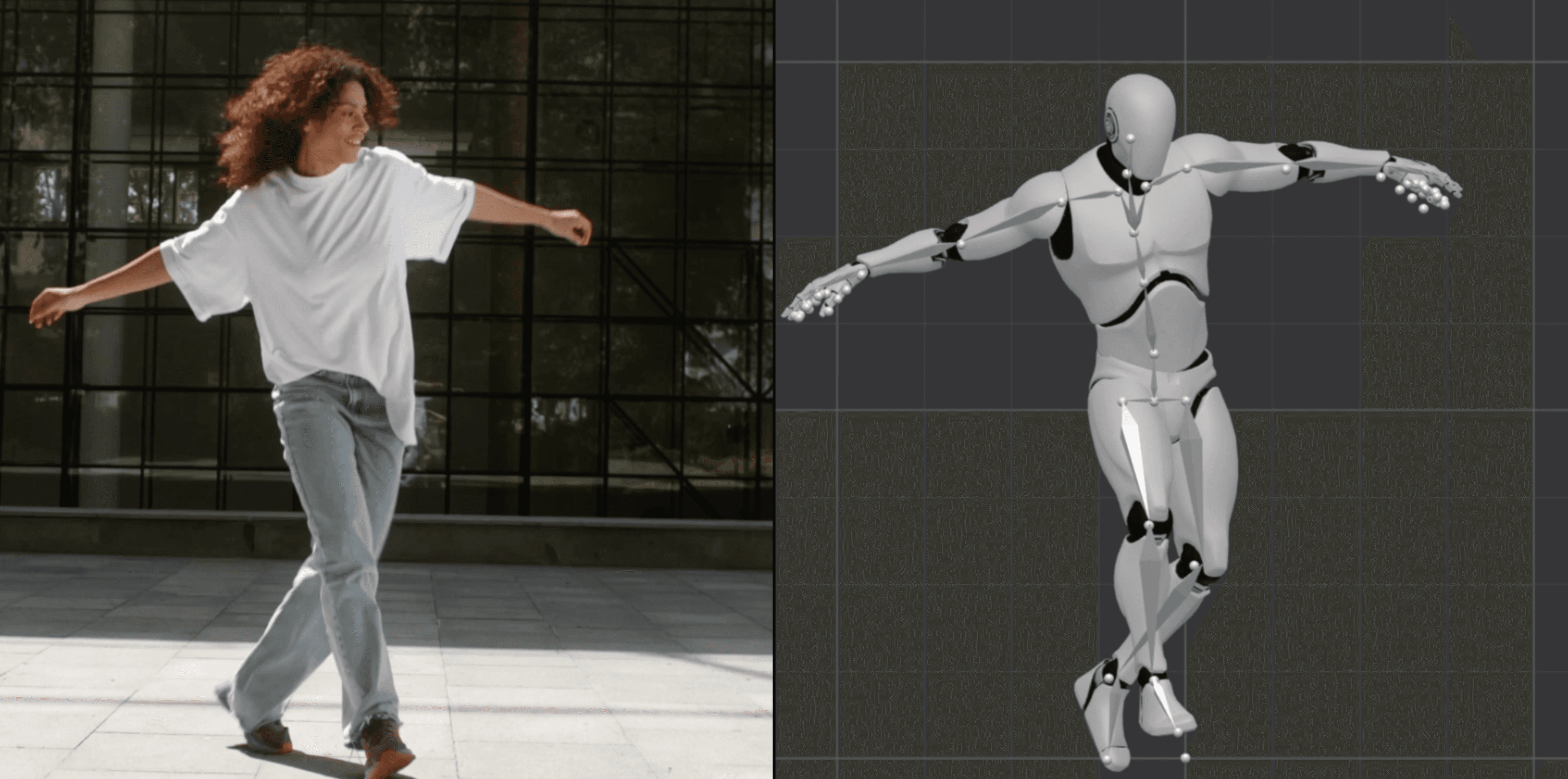
Turn any video into studio-quality 3D animation with AI motion capture -- no suits or sensors.
Data verified Sep 14, 2026
Score
- Try it free
- Free plan
- Best for
- Game & film creators
About Plask
Plask is a browser-based AI motion capture tool that converts ordinary video footage -- even smartphone clips -- into 3D character animation without motion-capture suits, sensors, or specialized hardware. It's aimed at animators, game developers, and filmmakers (both professionals and beginners) who need markerless single-camera mocap, plus AI-assisted lighting, camera, and post-processing they can export to Unreal, Unity, Maya, and Blender. Its main differentiator is delivering full markerless body capture and cinematic rendering entirely in the browser from a single video source.
Screenshots
Commonly Cited Strengths & Limitations
Strengths
- Markerless motion capture from a single ordinary video with no suit or hardware
- Simplifies and speeds up the 3D animation process
- Runs in the browser and is accessible to beginners
- Exports to industry-standard tools like Unreal, Unity, Maya, and Blender
Limitations
- Struggles with fast or complex movements, and feet often slide or float due to poor ground-contact detection
- Depth estimation is less accurate for limbs moving toward or away from the camera
- Occlusion causes the AI to guess hidden joint positions, sometimes producing unnatural poses
- Limited finger tracking and no full hand tracking
- Fewer editing and customization options than advanced animation software
- Limited guidance makes it harder to use for larger or more complex projects
- Browser-based processing can limit very complex scenes or long animations
- Camera shake in source video can produce jittery output
Common Use Cases
- Motion capture from video
- Creating 3D character animations
- Producing animations for games, films, and virtual content
- Custom TikTok-style and viral dance videos
Details
- Pricing Model
- Freemium
- Category
- Design & Creative
Who is Plask for?
Game & film creators
Generate natural body animations from a single camera source ready for games, films, and virtual content.
3D animators
Import their own 3D characters, apply extracted motion, and refine with AI lighting, camera, and post-processing.
Social video creators
Get custom TikTok-style and viral dance animations produced for them within 24 hours.
Frequently Asked Questions
Is Plask free?
Plask offers a free plan.
Does Plask have an API?
Plask does not currently offer a public API.
What does Plask integrate with?
Plask integrates with Unreal, Unity, Maya, Blender.
Is Plask cloud-based or self-hosted?
Plask is offered as a cloud-based (SaaS) deployment.
What are the downsides of Plask?
Struggles with fast or complex movements, and feet often slide or float due to poor ground-contact detection Also, Depth estimation is less accurate for limbs moving toward or away from the camera
Who is Plask best for?
Plask is best suited for Game & film creators, 3D animators, Social video creators.
What can I use Plask for?
Common uses for Plask include motion capture from video, creating 3d character animations, producing animations for games, films, and virtual content, custom tiktok-style and viral dance videos.
What is the best alternative to Plask?
Our reviewed alternatives to Plask are Krikey AI and Kaiber.
How does Plask compare to InfiniteArt.ai?
Plask and InfiniteArt.ai are both used for design & creative -- specifically video editing tools. See the full side-by-side comparison for pricing and feature differences.
Key Features
- AI motion captureExtracts precise body motion data from a single-camera video using AI, with no suits or sensors required.
- Model animationApplies captured motion to imported 3D characters, with blinking and physics supported for MMD and VRM models.
- AI-assisted cinematographyAutomates lighting and camera controls to produce 3D renders with minimal manual effort.
- Hollywood-grade post-processingAdds vignettes, motion blur, auto-focus depth-of-field, and advanced tone mapping to animations.
- Versatile exportGenerates high-quality video renders or exports 3D assets compatible with Unreal, Unity, Maya, and Blender.
- Custom 3D animation serviceOffers done-for-you TikTok-style and viral dance animations delivered within 24 hours.
- Multi-person extractionExtracts motion from multiple people in a video and can include the initial pose.
- Browser-basedRuns directly in a web browser without dedicated hardware.
Integrations
Technical Details
- Deployment
- Cloud
- Target Market
- B2B
- Free Plan
- Available
Real Pricing from Verified Users
See what people actually pay for Plask
Reviews
0 reviews
No reviews yet. Be the first to share your experience!
Switching Stories
Real migration experiences with Plask
Discussion
Ask questions, share tips, or discuss this tool with other users.
No discussion yet. Start the conversation!
Plask alternatives we reviewed
Reviewed when this listing was published; open-source options are marked.
Krikey AI
Platform for generating and editing talking 3D character animations
Kaiber
AI video and music visualization for creators
Similar tools in Design & Creative
Other listed tools in Design & Creative, not reviewed as direct alternatives

AI creative studio for iOS and Mac that turns text into images and animates them into video.
Also Video Editing Tools
- Text-to-image generation
- Generate videos
- Multiple image models
AI dubbing and localization with a full editor to transcribe, translate, caption, and dub in 50+ languages.
Also Video Editing Tools
- Automated dubbing
- Transcription
- Translation

- Seedance 2.5
- Nano Banana Pro
- Higgsfield Genjutsu

AI creative agents that turn one brief into on-brand images, video, copy, slides, and audio
Also Video Editing Tools
- AI Agent
- Brand consistency
- Smart Model Routing

- Video translation and dubbing
- Voice cloning
- Lip-sync

- ClipAnything
- ReframeAnything
- AI captioning
Also used for
People Also Viewed


More in Design & Creative
Collaborative interface design tool

The world's best image editing software