
Presenti
AI presentation maker that turns notes, docs, PDFs and mind maps into polished slides in minutes
Data verified Sep 9, 2026
Score
- Price
- $6/mo
- Try it free
- Free plan
- Best for
- Business professionals
About Presenti
Presenti is an AI presentation maker that converts raw text, Word/PDF documents, Markdown files, or mind maps into designer-grade slide decks, automatically handling layout, color, and typography so you never touch a font size. It's aimed at anyone who needs professional decks fast — business professionals building pitch decks, educators creating lectures, marketers, and technical presenters — and its standout is a strong set of file-import options paired with a template-first AI that generates a logical narrative structure for you.
Screenshots
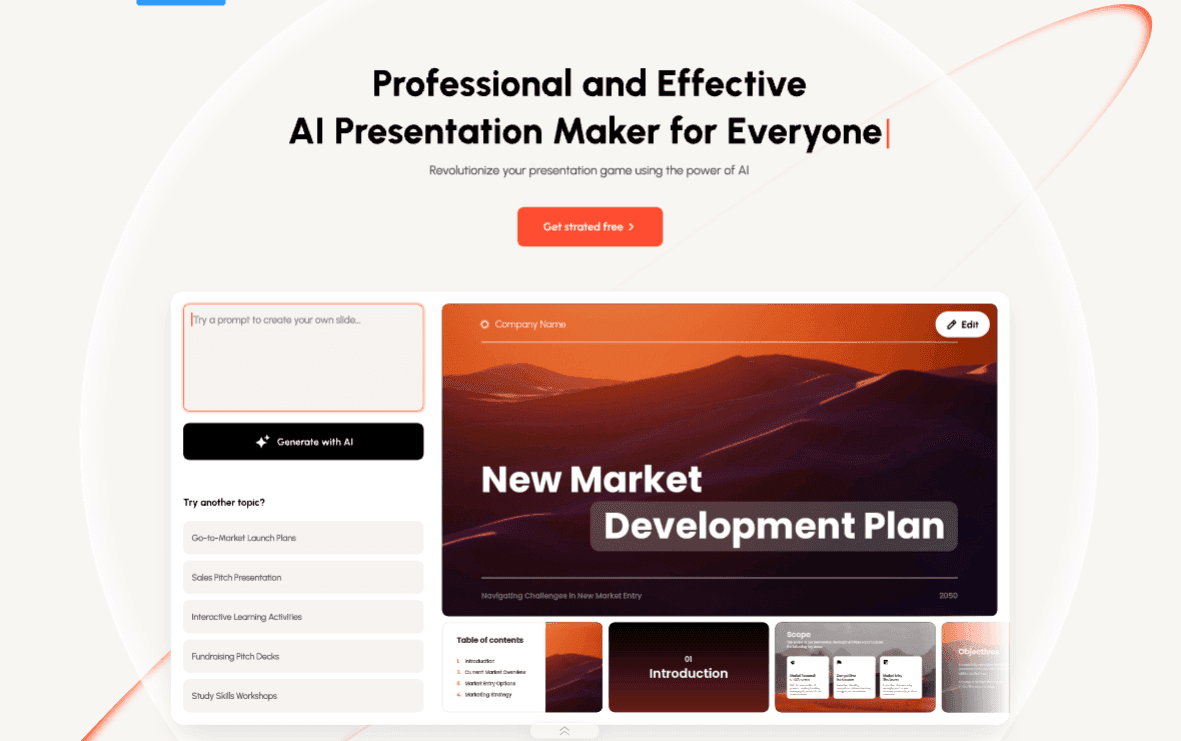
Commonly Cited Strengths & Limitations
Strengths
- Generates coherent, visually appealing decks in minutes
- Supports many import formats (Word, PDF, TXT, Markdown, XMind mind maps)
- Intuitive, familiar editor similar to Google Docs/PowerPoint
- Rich element support (tables, charts, icons, images, audio, mind maps)
- Good for converting existing content you already have
Limitations
- AI-generated slides can be text-heavy and need trimming
- Users report challenges with text modification and image relevance
- No commercial license — personal use only, per some reviewers
- Billing complaints: unclear cancellation and unexpected auto-charging
- Bugs reported, including random Chinese text appearing in decks
- Unrelated charts/graphs added with no way to exclude them
- Sometimes generates only an outline, burning credits without producing slides
- Poor PDF export quality (low-resolution, mushy images with no resolution settings)
- Occasional 'unsupported file type' errors when uploading Markdown or PowerPoint files
Common Use Cases
- Creating investor and startup pitch decks
- Converting Word/PDF/Markdown documents into slides
- Building classroom lectures and educational presentations
- Turning mind maps into structured presentations
- Producing marketing and business presentations from a topic or keywords
Details
- Pricing Model
- Freemium
- Starting Price
- $6/mo
- Category
- Design & Creative
Who is Presenti for?
Business professionals
Build high-stakes investor pitch decks and corporate presentations from notes or a topic.
Educators & students
Generate classroom lectures and study presentations using education-styled templates.
Developers & technical presenters
Convert Markdown files directly into slides without reformatting content by hand.
Marketers
Produce on-brand marketing decks quickly using curated marketing templates.
Frequently Asked Questions
Is Presenti free?
Presenti offers a free plan, with paid plans starting at $6/mo.
Does Presenti have an API?
Presenti does not currently offer a public API.
What does Presenti integrate with?
Presenti integrates with XMind.
Is Presenti cloud-based or self-hosted?
Presenti is offered as a cloud-based (SaaS) deployment.
What are the downsides of Presenti?
AI-generated slides can be text-heavy and need trimming Also, Users report challenges with text modification and image relevance
Who is Presenti best for?
Presenti is best suited for Business professionals, Educators & students, Developers & technical presenters.
What can I use Presenti for?
Common uses for Presenti include creating investor and startup pitch decks, converting word/pdf/markdown documents into slides, building classroom lectures and educational presentations, turning mind maps into structured presentations.
What is the best alternative to Presenti?
Our reviewed alternatives to Presenti are Prezi and Presentations.ai.
How does Presenti compare to Beautiful AI?
Presenti and Beautiful AI are both used for design & creative -- specifically presentation-tools. See the full side-by-side comparison for pricing and feature differences.
Key Features
- Text to presentationTransforms plain text and raw ideas into visually styled slides.
- Word to presentationConverts existing Word documents into polished, on-brand slides.
- PDF to presentationTurns static PDFs into editable, dynamic presentations.
- Markdown to presentationRenders lightweight Markdown syntax into slides, suited to developers and technical presenters.
- Mindmap to presentationConverts brainstorming mind maps (e.g. XMind) into structured decks that preserve the idea flow.
- Template to presentationUses pre-designed templates to quickly build cohesive, professional decks.
- AI designerAutomatically refines layout, color scheme, and typography across every slide.
- Logical structure generationBuilds a narrative flow from a topic or keywords to keep audiences engaged.
- Template libraryDesigner-curated styles including Business, Marketing, Education, Pitch Deck, Minimalist, and Creative.
- AI image generationGenerates images for slides (included in the Pro plan).
- AI AgentsExclusive Pro-plan AI agent capabilities for creating presentations.
- Rich slide elementsAdd tables, charts, icons, images, audio, and mind maps to slides in a few clicks.
- Multi-format exportExport finished decks as PPTX, PDF, PNG, and JPG.
Integrations
Technical Details
- Deployment
- Cloud
- Target Market
- Both
- Free Plan
- Available
Official Pricing
Presenti's published plans · verified Sep 9, 2026
Free
$0/mo
- Get started free with AI presentation generation
Pro
$8/mo
- 60% discount promotional price
- Exclusive access to AI Agents
- AI image generation
- Import from TXT, PDF, Markdown, Word, XMind and more
- Vast collection of premium PPT templates
- Export to PPTX, PDF, PNG, and JPG
Pricing shown above is sourced from Presenti's own published plans as of Sep 9, 2026 and can change at any time -- confirm current pricing on Presenti's own site before purchasing.
Full Presenti pricing breakdown, free plan and cheaper alternatives →
Real Pricing from Verified Users
See what people actually pay for Presenti
Reviews
0 reviews
No reviews yet. Be the first to share your experience!
Switching Stories
Real migration experiences with Presenti
Discussion
Ask questions, share tips, or discuss this tool with other users.
No discussion yet. Start the conversation!
Presenti alternatives we reviewed
Reviewed when this listing was published; open-source options are marked.
Prezi
AI-assisted presentation tool with a dynamic, zoomable canvas.
Presentations.ai
AI presentation generator that creates and formats decks from prompts.
Similar tools in Design & Creative
Other listed tools in Design & Creative, not reviewed as direct alternatives

- Create with AI
- Smart Slides
- Auto-aligning slide layouts
AI presentation maker that turns raw ideas into animated, on-brand slides in minutes.
Also presentation-tools
- Animated slides
- Diverse themes
- Brand consistency

AI agents turn prompts, docs, or links into interactive presentations and infographics.
Also presentation-tools
- AI Agents
- Modular blocks
- AI blocks

AI that turns a prompt or file into polished decks, docs, and sites in minutes.
Also presentation-tools
- AI presentation generation
- AI documents and webpages
- AI image generation

Turn your text into presentation-ready visuals, diagrams, and decks -- no prompting needed.
Also presentation-tools
- Visuals
- Slides (Beta)
- Mind Maps

The #1 AI platform for schools, with 80+ tools that save teachers time and support every student.
Also presentation-tools
- 80+ Teacher Tools
- 50+ Student Tools
- Lesson Plan Generator
Also used for
People Also Viewed


More in Design & Creative

Collaborative interface design tool

The world's best image editing software