
superReply
AI email reply generator Chrome extension for Gmail and Outlook
Data verified Nov 17, 2026
Score
- Price
- Not published
- Try it free
- Free plan
- Best for
- Customer support reps
- Platforms
- Chrome extension
Editorial Verdict
AI-researched, not hands-on testedsuperReply is a Chrome extension that drafts AI email replies inside Gmail and Outlook with tone controls, and its site lists WhatsApp, Slack, LinkedIn, Upwork and Fiverr among the places it works. It suits customer support reps, salespeople and freelancers who want faster inbox turnaround, with a free allowance of 90 replies a month. One limitation is that paid-plan prices are not published on the site. Chat tools that are not built into the inbox only cover the drafting step, not one-click replies inside Gmail or Outlook.
Reviewed by AIToolPundit Editorial Team · last verified November 2026
About superReply
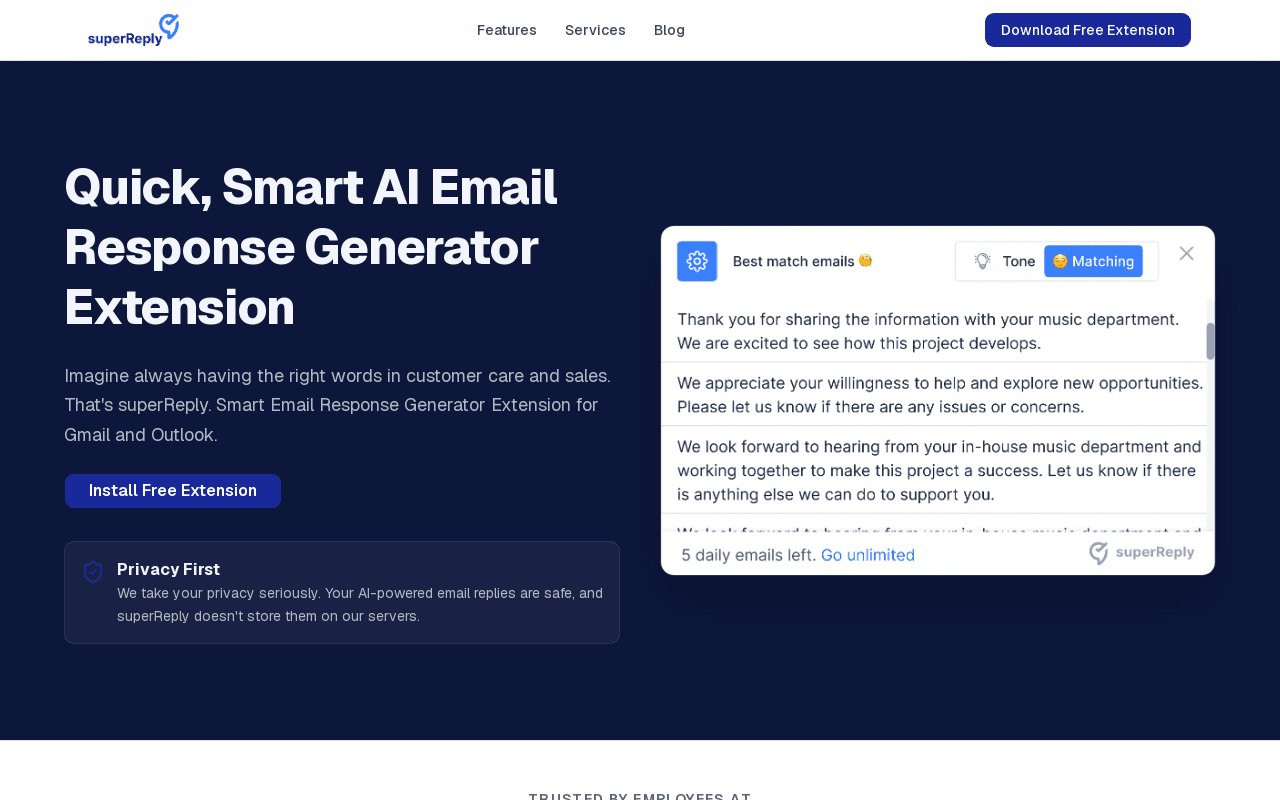
superReply is a Chrome extension that generates AI-powered email replies inside Gmail and Outlook. It suggests responses in a matching tone of voice with one click, and the free starter plan allows up to 90 replies per month before an upgrade is required. The site states that generated replies are not stored on the company's servers and that the extension only accesses the emails the user chooses to use it on.
The extension is also described as working alongside other places users already write, including WhatsApp, Slack, LinkedIn, Upwork, and Fiverr. Paid plans unlock unlimited replies and advanced tone controls, billed monthly or annually, and team plans are available for multi-seat usage. Support is handled over email with a stated response time of one business day.
Screenshots
Commonly Cited Strengths & Limitations
Strengths
- Free tier covers 90 replies per month
- Works inside Gmail and Outlook web inboxes
- Site states replies are not stored on servers
Limitations
- Paid plan prices are not published on the site
- Installed from the Chrome Web Store, with no other browser or app named
- Each user needs their own install and account; team plans exist for multiple seats
Common Use Cases
- Drafting replies to customer support emails
- Responding to sales inquiries from inside Gmail or Outlook
- Handling freelance client messages on Upwork and Fiverr
Details
- Pricing Model
- Freemium
- Starting Price
- Not published
- Platforms
- Chrome extension
- Category
- AI Writing & Content
Who is superReply for?
Customer support reps
People answering repetitive support tickets who want faster reply drafts in Gmail or Outlook.
Salespeople and freelancers
Users handling outreach replies across Gmail, LinkedIn, Upwork, and Fiverr who need on-brand tone options.
Frequently Asked Questions
Is superReply free?
superReply offers a free plan, with paid plans starting at Not published.
Does superReply have an API?
superReply does not currently offer a public API.
What platforms does superReply support?
superReply is available on Chrome extension.
What are the downsides of superReply?
Paid plan prices are not published on the site Also, Installed from the Chrome Web Store, with no other browser or app named
Who is superReply best for?
superReply is best suited for Customer support reps, Salespeople and freelancers.
What can I use superReply for?
Common uses for superReply include drafting replies to customer support emails, responding to sales inquiries from inside gmail or outlook, handling freelance client messages on upwork and fiverr.
What is the best alternative to superReply?
Our reviewed alternatives to superReply are Lavender, Grammarly, MailMaestro, Microsoft Copilot in Outlook and Twain.
How does superReply compare to Layerpath?
superReply and Layerpath are both used for ai writing & content -- specifically customer support tools. See the full side-by-side comparison for pricing and feature differences.
Key Features
- AI-suggested repliesGenerates reply options inside the inbox with one click.
- Tone-matching suggestionsOffers personalized responses for professional or casual contexts.
- Gmail and Outlook supportInstalls from the Chrome Web Store and appears inside Gmail and the Outlook web inbox.
- Free monthly allowanceFree plan covers up to 90 AI-powered replies per month.
- Privacy handlingReplies are not stored on superReply's servers and only accessed emails are processed.
- Team plansMulti-seat plans are available for teams that need to manage multiple users.
Technical Details
- Free Plan
- Available
Official Pricing
superReply's published pricing · verified Nov 17, 2026
Not published
Pricing shown above is sourced from superReply's own published plans as of Nov 17, 2026 and can change at any time -- confirm current pricing on superReply's own site before purchasing.
Real Pricing from Verified Users
See what people actually pay for superReply
Reviews
0 reviews
No reviews yet. Be the first to share your experience!
Switching Stories
Real migration experiences with superReply
Discussion
Ask questions, share tips, or discuss this tool with other users.
No discussion yet. Start the conversation!
superReply alternatives we reviewed
Reviewed when this listing was published; open-source options are marked.
Lavender
AI sales email coach that scores and rewrites outbound replies in Gmail and Outlook.
Grammarly
Writing assistant browser extension with generative reply drafting across inboxes and web apps.
MailMaestro
AI email assistant for Outlook and Gmail that drafts and summarises emails.
Microsoft Copilot in Outlook
Microsoft's AI assistant that drafts and summarises emails inside Outlook.
Twain
AI writing assistant for outreach and replies in email and LinkedIn.
Similar tools in AI Writing & Content
Other listed tools in AI Writing & Content, not reviewed as direct alternatives

Turn one screen recording into interactive walkthroughs, guides, videos, and SOPs.
Also Customer Support Tools
- Multi-format export
- Create with Agent
- Screen recording
- Humanizer
- AI Detector
- Stealth Writer
- Broadcasts
- Chatbot flow builder
- Shared team inbox
- AI support
- Live chat
- AI copilot

- Browser extensions
- Mobile and desktop apps
- Reads AI chat answers
AI suite for sales and support conversations on WhatsApp and other messaging channels
Also Customer Support Tools
- Omnichannel team inbox
- AI agents
- Automation flow builder
People Also Viewed


More in AI Writing & Content
AI writing assistant


AI content writing tool by Semrush that turns keywords into SEO-optimized articles.