
Desktop Commander MCP
Give ChatGPT, Claude and other AI clients access to your own computer via MCP
Data verified Nov 16, 2026
Score
- Price
- Free; Pro $20/month + VAT
- Try it free
- Free plan
- Best for
- Developers
- Platforms
- macOS
Editorial Verdict
AI-researched, not hands-on testedDesktop Commander is an MCP server that gives AI chat clients hands-on access to your own files, terminal and processes, with a free open-source local build and a paid hosted Remote MCP for web clients. It suits developers and power users who want their assistant to act on a real machine rather than a sandbox. The main limitation is that the hosted free tier caps tool calls at 10,000 per month, and the pages do not list supported operating systems.
Reviewed by AIToolPundit Editorial Team · last verified November 2026
About Desktop Commander MCP
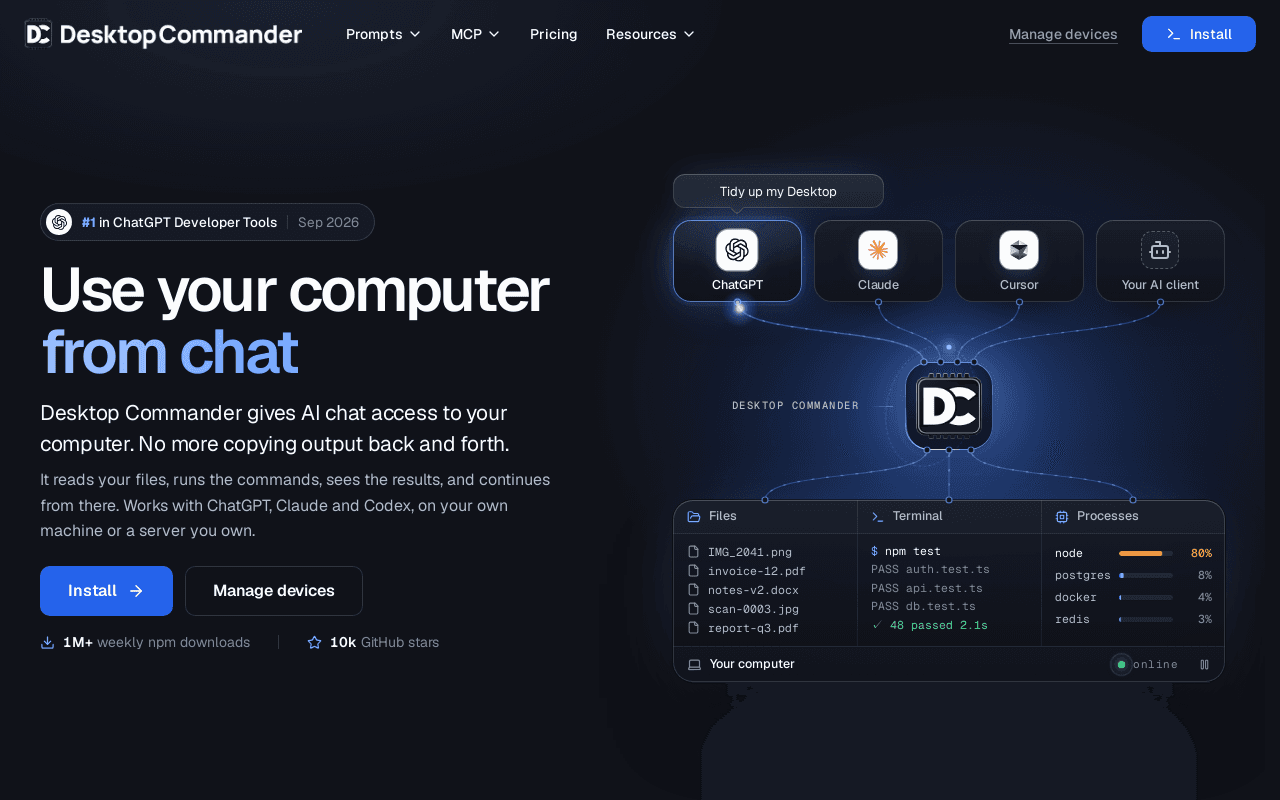
Desktop Commander is an MCP-based bridge that lets AI chat clients read files, run terminal commands, and manage processes on a computer you own. It ships in two forms: a local MCP server that is free and open source and runs on your machine with Claude Desktop, Cursor, Windsurf or any other MCP client, and a hosted Remote MCP endpoint that lets web clients such as ChatGPT and Claude reach a laptop, desktop or server you have connected to your account.
After a one-time setup, users sign in with email, register the devices they want to reach, and install the plugin or connector in their AI client. The assistant can then list directories, move or edit files, run shell commands, inspect running processes and report back inside the same conversation. The hosted service has a Free plan with 10,000 tool calls per month and a Pro plan at $20/month plus VAT with unlimited tool calls and priority support. The project reports 1M+ weekly npm downloads and 10k GitHub stars, and provides a prompt library of 60+ workflows.
Screenshots
Commonly Cited Strengths & Limitations
Strengths
- Local MCP server is free and open source with no account needed
- Works with multiple AI clients including ChatGPT, Claude, Cursor, VS Code and Windsurf
- Remote MCP lets web and mobile AI clients reach your own machine
Limitations
- Free hosted plan is capped at 10,000 tool calls per month
- Acts on your real machine rather than a sandbox, so permissions and safety are the user's responsibility
- Requires an MCP-capable AI client to use
Common Use Cases
- Sort, rename and deduplicate local files and folders from a chat prompt
- Run and fix failing tests in a local codebase through an AI client
- Inspect a remote VPS, read logs and deploy changes from ChatGPT or Claude
Details
- Pricing Model
- Freemium
- Starting Price
- Free; Pro $20/month + VAT
- Platforms
- macOS
- Category
- Developer Tools
Who is Desktop Commander MCP for?
Developers
Engineers who want their AI assistant to read repositories, run tests, fix code and deploy changes directly on their own machine or server.
Power users and sysadmins
People who want to manage files, servers and home devices from a chat window, including from a phone via the remote endpoint.
Frequently Asked Questions
Is Desktop Commander MCP free?
Desktop Commander MCP offers a free plan, with paid plans starting at Free; Pro $20/month + VAT.
Does Desktop Commander MCP have an API?
Desktop Commander MCP does not currently offer a public API.
Is Desktop Commander MCP open source?
Yes, Desktop Commander MCP is open source.
What platforms does Desktop Commander MCP support?
Desktop Commander MCP is available on macOS.
What are the downsides of Desktop Commander MCP?
Free hosted plan is capped at 10,000 tool calls per month Also, Acts on your real machine rather than a sandbox, so permissions and safety are the user's responsibility
Who is Desktop Commander MCP best for?
Desktop Commander MCP is best suited for Developers, Power users and sysadmins.
What can I use Desktop Commander MCP for?
Common uses for Desktop Commander MCP include sort, rename and deduplicate local files and folders from a chat prompt, run and fix failing tests in a local codebase through an ai client, inspect a remote vps, read logs and deploy changes from chatgpt or claude.
What is the best alternative to Desktop Commander MCP?
Our reviewed alternatives to Desktop Commander MCP are Open Interpreter, Cline, Goose, Claude Code and OpenAI Codex. Open-source options: Open Interpreter, Cline, Goose.
How does Desktop Commander MCP compare to Browse AI?
Desktop Commander MCP and Browse AI are both used for developer tools -- specifically automation & workflow tools. See the full side-by-side comparison for pricing and feature differences.
Key Features
- File and folder operationsReads, writes, moves, renames and searches files and folders on the connected machine from inside the chat.
- Terminal command executionRuns shell commands and scripts on your computer and returns the output to the AI client.
- Process inspectionLists and inspects running processes so the assistant can diagnose what is active on the machine.
- Remote MCP endpointHosted MCP endpoint lets web AI clients such as ChatGPT and Claude Web reach your own machine from any device.
- Multi-device supportRegister multiple devices (laptop, desktop, server) and pick which machine the assistant should act on.
- Local open-source MCP serverA free, open-source local MCP server works with Claude Desktop, Cursor, Windsurf and any other MCP client without an account.
Technical Details
- Free Plan
- Available
Official Pricing
Desktop Commander MCP's published plans · verified Nov 16, 2026
Free
$0/month/mo
- 10,000 tool calls per month
- ChatGPT, Claude and any MCP client
- Connect your devices
- Community support
Pro
$20/month + VAT/mo
- Unlimited tool calls
- ChatGPT, Claude and any MCP client
- Connect your devices
- Priority support
Local MCP server
Free
- Open source
- No account required
- No monthly limit
- Runs on your machine
Pricing shown above is sourced from Desktop Commander MCP's own published plans as of Nov 16, 2026 and can change at any time -- confirm current pricing on Desktop Commander MCP's own site before purchasing.
Full Desktop Commander MCP pricing breakdown, free plan and cheaper alternatives →
Real Pricing from Verified Users
See what people actually pay for Desktop Commander MCP
Reviews
0 reviews
No reviews yet. Be the first to share your experience!
Switching Stories
Real migration experiences with Desktop Commander MCP
Discussion
Ask questions, share tips, or discuss this tool with other users.
No discussion yet. Start the conversation!
Desktop Commander MCP alternatives we reviewed
Reviewed when this listing was published; open-source options are marked.
Open Interpreter
Open sourceNatural-language interface that lets LLMs run code and commands on your local machine.
- Cost:
- Free, open source
- Licence:
- Open source
Cline
Open sourceAutonomous AI coding agent for VS Code that reads files, runs commands and edits code locally.
- Cost:
- Free, open source (bring your own API key)
- Licence:
- Open source
Goose
Open sourceOpen-source local AI agent from Block with MCP extensions for files, shell and developer tools.
- Cost:
- Free, open source
- Licence:
- Open source
Claude Code
Anthropic's terminal coding agent that reads files, runs commands and edits code locally.
OpenAI Codex
Coding agent from OpenAI that works with files and a terminal on your behalf.
Similar tools in Developer Tools
Other listed tools in Developer Tools, not reviewed as direct alternatives

- AI-powered data extraction
- Website change monitoring
- Scheduled runs
AI suite for sales and support conversations on WhatsApp and other messaging channels
Also Automation & Workflow Tools
- Omnichannel team inbox
- AI agents
- Automation flow builder
- Natural language task capture
- Today, Upcoming & custom filters
- Planning & scheduling

- Replit chat
- Free mode
- Infinite Canvas

- Coding agents
- Cloud agents
- CLI

- Model selection
- Custom and third-party agents
- Copilot cloud agent


More in Developer Tools
The platform for smart business apps


The agentic IDE powered by Codeium AI

Prompt, run, edit & deploy full-stack apps in the browser