
Hive
The world's first democratically built productivity platform
Data verified Sep 14, 2026
- Price
- Free
- Try it free
- Free plan
- Best for
- Marketers
- Platforms
- Web, iOS, Android, Mac, Windows
Editorial Verdict
AI-researched, not hands-on testedHive's AI proofing genuinely saves real time -- 5+ hours a week by its own data, catching edits manual review misses. The honest cost structure: essential features sit behind premium add-ons that can push the fully-loaded price to around $25/user/month, and bugs/slowdowns are a recurring complaint after new feature releases.
Reviewed by AIToolPundit Editorial Team · last verified October 2026
About Hive
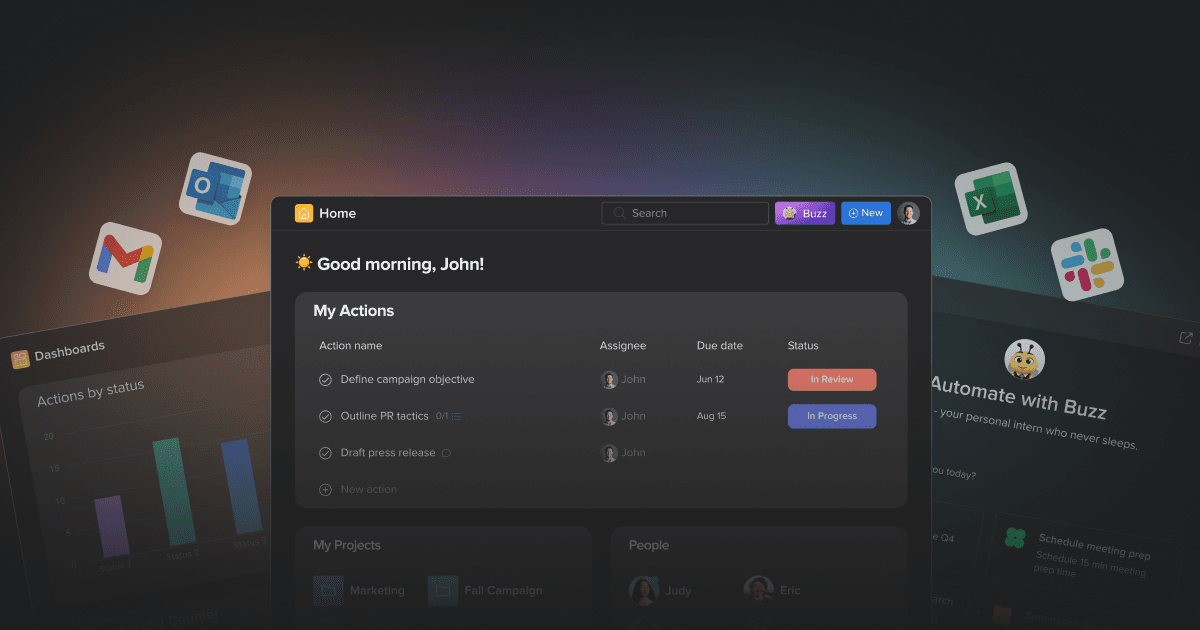
Hive is a productivity platform built by users, for users. With flexible project views, native chat, time tracking, and AI-powered features, Hive helps teams of all sizes work faster and more efficiently.
Screenshots
Commonly Cited Strengths & Limitations
Strengths
- Saves 5+ hours per week in proofing edits
- AI proofing catches what manual review misses
- Brings multiple tools into one workspace
Limitations
- Essential features are locked behind premium add-ons (~$5/user/month) that can push costs up to ~$25/user/month when fully loaded
- Confusing to navigate at first with a steep learning curve for new users; poor UI makes it hard to tell a glitch from user error
- Frequent bugs and unexplainable slowdowns, with new features rushed out that introduce new bugs
- Weak mobile apps that limit functionality, and limited time-tracking tools (some users gave up and used spreadsheets)
- Task dependencies feature missing or malfunctioning
- File manager doesn't show thumbnails and custom fields only exist within action cards, not table columns
- Minimal offline access; few and hard-to-adjust task/project templates
- Not well equipped to scale to the needs of a large global company
- Chat function unreliable — sometimes fails to show messages or notify users
Common Use Cases
- Project management
- Task management
- Workflow automation
- Team collaboration
- Time management
- Reporting and dashboards
- CRM
- Finance
- Proofing and approvals
- Client work management
Details
- Pricing Model
- Freemium
- Starting Price
- Free
- Founded
- 2015
- Team Size
- 51-200
- Headquarters
- New York, NY
- Platforms
- WebiOSAndroidMacWindows
- Category
- Project Management
Who is Hive for?
Marketers
Marketers use Hive to automate campaign launches and set up manual campaign launch systems with forms, automation, and approvals.
Agencies
Agencies use Hive to manage client work, workflows, and proofing in one workspace.
PMOs
PMOs use Hive to plan work, track progress, and manage portfolios of projects and tasks.
Education & Non-Profit Teams
Education and non-profit teams use Hive to organize projects and keep work moving.
Frequently Asked Questions
Is Hive free?
Hive offers a free plan, with paid plans starting at Free.
Does Hive offer a free trial?
Yes, Hive offers a free trial of 14 days.
Does Hive have an API?
Yes, Hive provides an API for developers.
What platforms does Hive support?
Hive is available on Web, iOS, Android, Mac, Windows.
What does Hive integrate with?
Hive integrates with Slack, Google Workspace, Microsoft Office, Salesforce, Zoom.
Is Hive cloud-based or self-hosted?
Hive is offered as a cloud-based (SaaS) deployment.
What are the downsides of Hive?
Essential features are locked behind premium add-ons (~$5/user/month) that can push costs up to ~$25/user/month when fully loaded Also, Confusing to navigate at first with a steep learning curve for new users; poor UI makes it hard to tell a glitch from user error
Who is Hive best for?
Hive is best suited for Marketers, Agencies, PMOs.
What can I use Hive for?
Common uses for Hive include project management, task management, workflow automation, team collaboration.
How does Hive compare to Trello?
Hive and Trello are both used for project management. See the full side-by-side comparison for pricing and feature differences.
Key Features
- Buzz AI AssistantA 24/7 AI assistant that plans, assigns, follows up, summarizes work, manages your inbox, and analyzes proofs.
- AI ProofingBuzz analyzes proofs in seconds and flags claims needing evidence, such as unsupported medical statements.
- SidekickAn AI assistant in meetings that suggests next themes and questions to steer conversations.
- Workflows & AutomationBuild workflows with AI-powered steps to automate repeatable tasks and connect your favorite tools.
- Organize WorkVisualize, sort and filter projects and tasks with flexible views and clear priorities.
- CollaborationWork across actions, chat, notes and proofing so feedback stays in context.
- Time ManagementUnderstand how your team spends time and where projects need attention.
- Project ViewsMultiple views including Calendar, Kanban, Gantt, Timeline, Table, List, Portfolio, and Summary.
- AI Dashboard InsightsAI-powered summaries of your work data.
Integrations
Technical Details
- Deployment
- Cloud
- API
- Available
- Free Trial
- 14 days
- Free Plan
- Available
Official Pricing
Hive's published pricing · verified Sep 14, 2026
Free
Pricing shown above is sourced from Hive's own published plans as of Sep 14, 2026 and can change at any time -- confirm current pricing on Hive's own site before purchasing.
Real Pricing from Verified Users
See what people actually pay for Hive
Reviews
0 reviews
No reviews yet. Be the first to share your experience!
Switching Stories
Real migration experiences with Hive
Discussion
Ask questions, share tips, or discuss this tool with other users.
No discussion yet. Start the conversation!
Similar tools in Project Management
Other listed tools in Project Management, not reviewed as direct alternatives
- Inbox
- Planner
- Automation

- Super Agents
- Brain² (AI)
- Deep Search

Multi-layer scheduling that unites your calendar, tasks, and docs in one team timeline.
Similar tool in Project Management
- Calendar
- Roadmap
- FileFlow

- Capture knowledge
- Find answers
- Automate busywork

- Intake and integrations
- Planning and monitoring
- AI and automations
Cloud-based project and portfolio management for PMOs and professional services teams
Similar tool in Project Management
- Project management
- Portfolio management
- Budget management
People Also Viewed



More in Project Management

One app to replace them all

The issue tracker built for modern software teams
Scheduling automation for teams

Work OS that powers teams to run projects and workflows