Research Studio
AI-assisted UX research workspace for analysing interviews, transcripts and documents
Data verified Nov 13, 2026
Score
- Price
- From $12 / month (Individual, annual billing)
- Try it free
- Free trial (3 days)
- Best for
- Freelance UX designers and user researchers
- Platforms
- Web, macOS, Windows
Editorial Verdict
AI-researched, not hands-on testedResearch Studio is a UX research workspace that combines transcription in 99+ languages with a canvas of widgets for personas, journeys, jobs to be done, statements and competitors, plus an AI research assistant. It fits freelance researchers and agencies who want structure without writing prompts, and a desktop alpha adds local project storage for people who prefer to keep research off the cloud. The main limitation is that the pricing section lists paid plans with 3 to 7 day trials and no free plan. An open-source alternative that partly covers the qualitative coding side is QualCoder, though it has no AI-assisted widgets.
Reviewed by AIToolPundit Editorial Team · last verified November 2026
About Research Studio
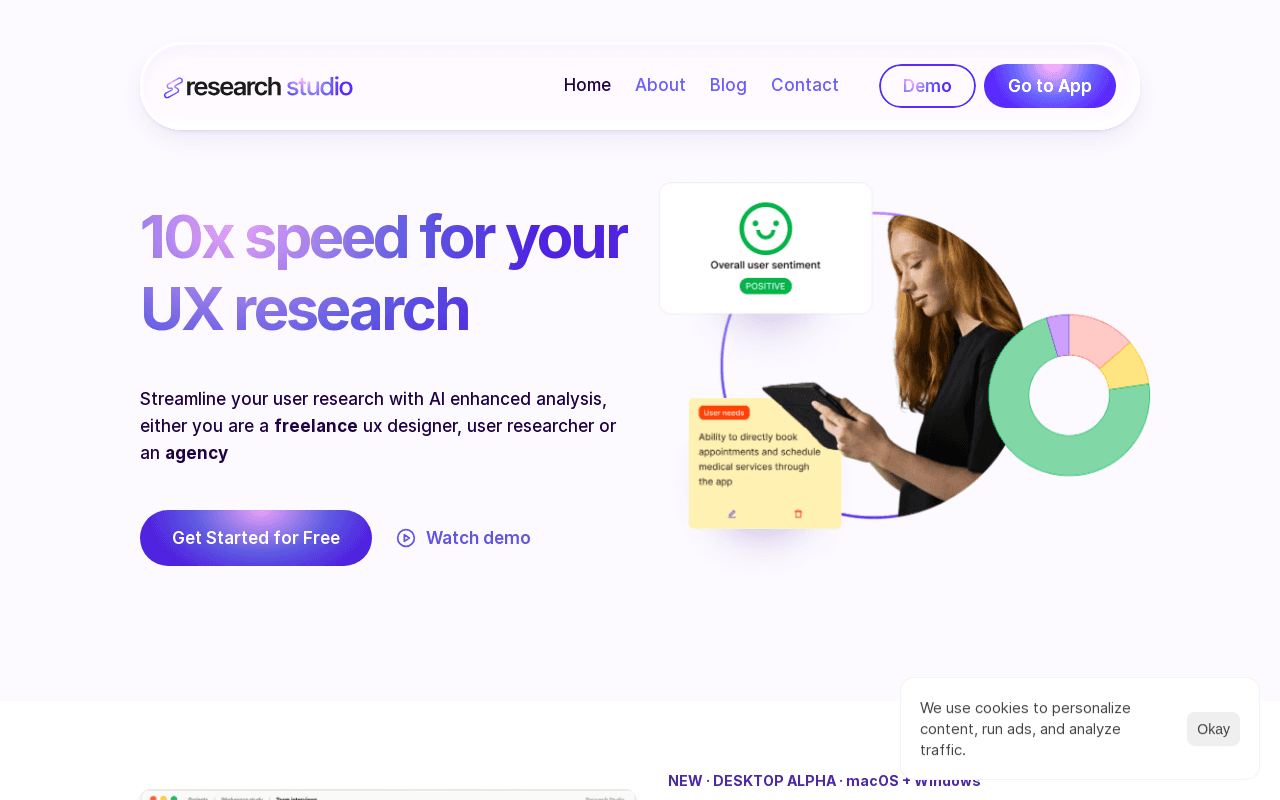
Research Studio is an AI-enhanced workspace for UX research. Users upload files such as PDFs, video, audio, Word or Excel documents (8+ formats in 99+ languages are supported), then analyse the content on a canvas using draggable smart widgets for Personas, Jobs to be Done, Statements with sentiment, User Journey, User Stories, Competitors and Questions Analysis. A personal AI assistant answers research questions, either locked in project context or with Broad Knowledge enabled.
The product is aimed at freelance UX designers, user researchers and agencies. Results can be presented in a click with brand customisation and exported to Notion. A desktop alpha for macOS and Windows adds local-first project storage with encrypted storage and a choice of AI provider; the page notes this is local storage, not necessarily offline processing, because external AI requests send the required content to the chosen provider. Individual plans are $12 / month on annual billing or $24 / month on monthly billing, and Business plans are $15 or $30 per user per month, with trials of 3 days (Individual) and 7 days for up to 5 users (Business).
Screenshots
Commonly Cited Strengths & Limitations
Strengths
- Transcription and analysis widgets in one canvas
- Supports 8+ formats in 99+ languages
- Desktop alpha stores projects on your own computer with encrypted storage
Limitations
- The pricing section lists paid plans with 3 to 7 day trials; no free plan is listed
- The desktop app is labelled alpha, for macOS and Windows
- External AI requests send the required content to the chosen provider, even in Desktop
Common Use Cases
- Transcribing recordings in multiple languages
- Building personas, user journeys and jobs to be done from research data
- Exporting findings to Notion and presenting them
Details
- Pricing Model
- Free Trial
- Starting Price
- From $12 / month (Individual, annual billing)
- Platforms
- WebmacOSWindows
- Category
- Design & Creative
Who is Research Studio for?
Freelance UX designers and user researchers
Individuals who want to turn research data into personas, journeys and jobs to be done.
Agencies
Teams on the Business plan, priced per user, with a 7-day trial for up to 5 users.
Frequently Asked Questions
How much does Research Studio cost?
Research Studio starts at From $12 / month (Individual, annual billing) (Free Trial).
Does Research Studio offer a free trial?
Yes, Research Studio offers a free trial of 3 days.
Does Research Studio have an API?
Research Studio does not currently offer a public API.
What platforms does Research Studio support?
Research Studio is available on Web, macOS, Windows.
What are the downsides of Research Studio?
The pricing section lists paid plans with 3 to 7 day trials; no free plan is listed Also, The desktop app is labelled alpha, for macOS and Windows
Who is Research Studio best for?
Research Studio is best suited for Freelance UX designers and user researchers, Agencies.
What can I use Research Studio for?
Common uses for Research Studio include transcribing recordings in multiple languages, building personas, user journeys and jobs to be done from research data, exporting findings to notion and presenting them.
What is the best alternative to Research Studio?
Our reviewed alternatives to Research Studio are QualCoder, Dovetail, Condens, Marvin, Looppanel, NVivo, Aurelius and Reduct. Open-source options: QualCoder.
How does Research Studio compare to AlphaResearch?
Research Studio and AlphaResearch are both used for design & creative -- specifically natural language analytics tools. See the full side-by-side comparison for pricing and feature differences.
Key Features
- Multi-format upload and transcriptionSupports 8+ formats in 99+ languages, including PDF, video, audio, Word and Excel files; Premium means unlimited transcriptions.
- Analysis widgetsDraggable widgets for Personas, Jobs to be Done, Statements, User Journey, User Stories, Competitors and Questions Analysis.
- Sentiment statementsThe Statements widget classifies user comments by sentiment.
- Research AI assistantA chat assistant answers research questions, either locked in project context or with Broad Knowledge enabled.
- Notion export and presentingPresent in a click with brand customisation, and export instantly to Notion.
- Desktop alpha with local storageResearch Studio Desktop (alpha, macOS and Windows) stores projects on your computer with encrypted storage and your choice of AI provider.
Technical Details
- Free Trial
- 3 days
Official Pricing
Research Studio's published plans · verified Nov 13, 2026
Individual (Freelancer) Annual
$12 / month/yr
- Pay for 9 months, get 12
- Up to 14 days of refund period
- Unlimited transcription hours
- Free 3 days trial, no credit card required
Individual (Freelancer) Monthly
$24 / month/mo
- Full flexibility
- Up to 7 days of refund period
- Start your 3 days trial, no credit card required
Business Annual
$15 / user / month/yr
- Pay for 9 months, get 12
- Up to 14 days of refund period
- Unlimited transcription hours
- Free 7 days trial for up to 5 users
Business Monthly
$30 / user / month/mo
- Up to 14 days of refund period
- 7 days trial for up to 5 users
Pricing shown above is sourced from Research Studio's own published plans as of Nov 13, 2026 and can change at any time -- confirm current pricing on Research Studio's own site before purchasing.
Full Research Studio pricing breakdown, free plan and cheaper alternatives →
Real Pricing from Verified Users
See what people actually pay for Research Studio
Reviews
0 reviews
No reviews yet. Be the first to share your experience!
Switching Stories
Real migration experiences with Research Studio
Discussion
Ask questions, share tips, or discuss this tool with other users.
No discussion yet. Start the conversation!
Research Studio alternatives we reviewed
Reviewed when this listing was published; open-source options are marked.
QualCoder
Open sourcePartial match: desktop qualitative data analysis app for coding text, audio and video
- Cost:
- Free
- Licence:
- Open source
Dovetail
Research repository with AI tagging, transcription and insight synthesis for product teams
Condens
UX research analysis platform for storing, transcribing and tagging qualitative data
Marvin
Qualitative research platform with AI transcription, tagging and theme generation
Looppanel
AI note-taker and analysis tool for user interviews with auto-tagging and highlight reels
NVivo
Industry-standard commercial qualitative data analysis suite for coding interviews, transcripts and documents with AI-assisted themes and sentiment.
Aurelius
UX research repository for tagging notes, finding patterns and sharing insights.
Reduct
Video research tool that transcribes interviews and lets teams tag and highlight clips.
Similar tools in Design & Creative
Other listed tools in Design & Creative, not reviewed as direct alternatives
AI-powered search engine that mines filings and earnings transcripts for investment insights.
Also Natural Language Analytics Tools
- Document Search
- Document Alerts & Filing Screener
- Trending Topics & Sentiment Analysis

- Meeting Transcription & Recording
- Speaker Recognition
- Auto-Language Detection
AI sales coaching and meeting intelligence that records calls, updates your CRM, and drafts follow-ups.
Also Meeting & Transcription Tools
- Omnichannel call capture
- AI summary & transcription
- Automatic CRM updates

- Gong Revenue AI OS
- Gong Engage
- Gong Forecast
- Conversational Analytics
- Universal Semantic Layer (LookML)
- Embedded Analytics
- Chat
- Video meetings
- Meeting recordings & transcripts
Also used for
People Also Viewed


More in Design & Creative

Collaborative interface design tool

The world's best image editing software