Screendrop
Open-source, self-hostable native Mac app for screenshots, screen recording, and Loom-style sharing
Data verified Sep 30, 2026
Score
- Price
- Free
- Try it free
- Free plan
Editorial Verdict
AI-researched, not hands-on testedScreendrop packs genuinely premium features — on-device OCR, smart redaction, a self-hostable Loom-style sharing page — into a free, open-source Mac app, making it a strong pick for anyone tired of paying a monthly fee just to share screen recordings with a link.
Reviewed by AIToolPundit Editorial Team · last verified September 2026
About Screendrop
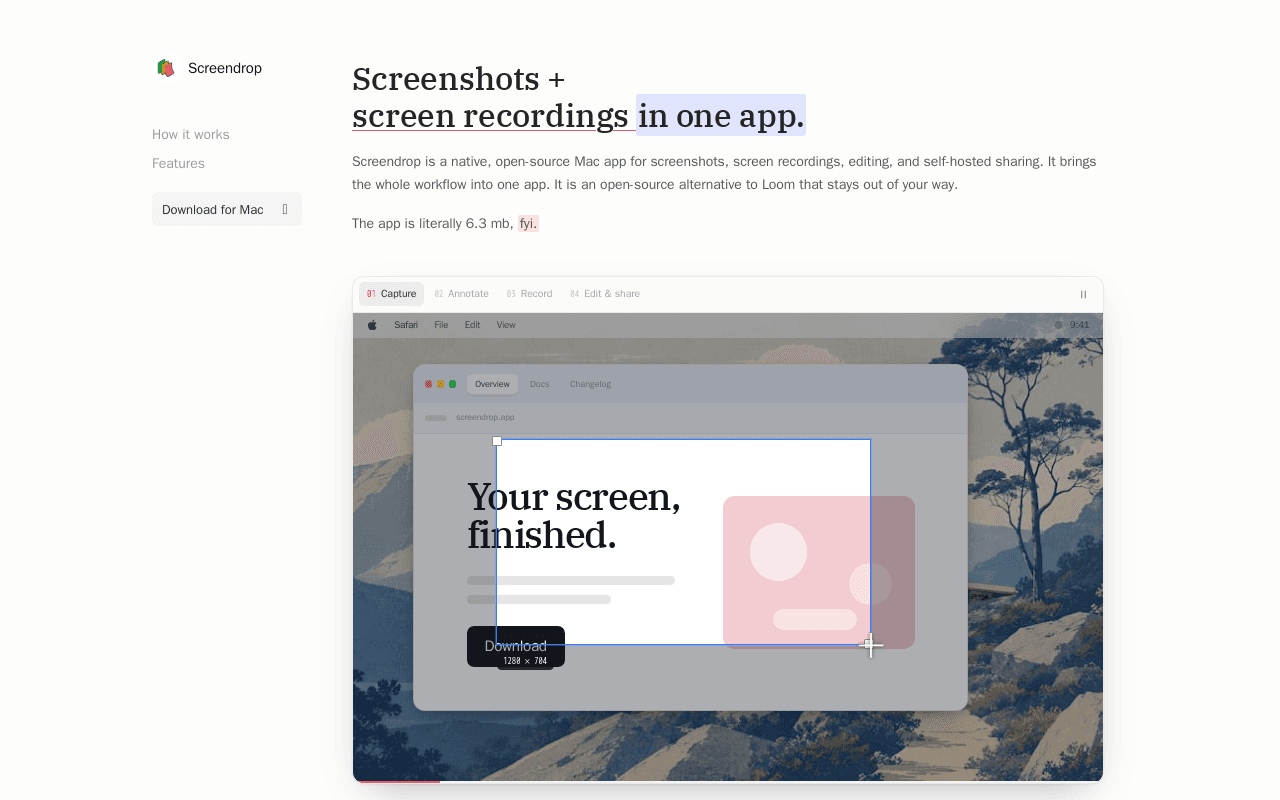
Screendrop is an open-source, native macOS menu-bar app for capturing screenshots and screen recordings, annotating them, and sharing them — built as a free, self-hostable alternative to Loom and similar paid tools. Screenshots capture at native display resolution, and screen recordings support display, window, or area sources with optional overlays like a mouse indicator or key-press captions. Every capture opens in a floating preview immediately, where it can be marked up with on-device OCR text extraction, non-destructive drawing annotations, cropping, smart redaction, background replacement, wallpaper packs, perspective effects, progressive blur, borders, and watermarks, then saved, copied, or uploaded from that same preview. Camera, microphone, and system audio record as separately editable sources during screen recordings. Cloud sharing doesn't require a paid backend: it runs on a small Cloudflare Worker setup that fits comfortably within Cloudflare's free tier, giving screenshots a clean shareable viewer and recordings a full Loom-style share page.
Screenshots
Commonly Cited Strengths & Limitations
Strengths
- Genuinely free and self-hostable — no subscription needed for Loom-style sharing
- On-device OCR and smart redaction go beyond what most screenshot tools offer for free
Limitations
- macOS only — no Windows or Linux version
Details
- Pricing Model
- Free
- Starting Price
- Free
- Team Size
- 1-10
- Category
- Productivity & Automation
Frequently Asked Questions
Is Screendrop free?
Yes, Screendrop is free to use.
Does Screendrop have an API?
Screendrop does not currently offer a public API.
Is Screendrop open source?
Yes, Screendrop is open source.
What are the downsides of Screendrop?
macOS only — no Windows or Linux version
How does Screendrop compare to iSpring Cloud AI?
Screendrop and iSpring Cloud AI are both used for productivity & automation. See the full side-by-side comparison for pricing and feature differences.
Key Features
- Native macOS captureMenu-bar app for screenshots and screen recordings at native display resolution.
- On-device OCR & annotationExtract text from a capture and mark it up non-destructively with drawing, cropping, and redaction tools.
- Separately editable audio sourcesCamera, microphone, and system audio record as independent tracks during screen recordings.
- Self-hosted sharing backendCloud sharing runs on a small Cloudflare Worker setup that fits Cloudflare's free tier — no paid backend required.
- Loom-style share pagesRecordings get a full share page with a clean viewer, similar to Loom's link-sharing experience.
Technical Details
- Free Plan
- Available
Official Pricing
Screendrop's published pricing · verified Sep 30, 2026
Free
Pricing shown above is sourced from Screendrop's own published plans as of Sep 30, 2026 and can change at any time -- confirm current pricing on Screendrop's own site before purchasing.
Real Pricing from Verified Users
See what people actually pay for Screendrop
Reviews
0 reviews
No reviews yet. Be the first to share your experience!
Switching Stories
Real migration experiences with Screendrop
Discussion
Ask questions, share tips, or discuss this tool with other users.
No discussion yet. Start the conversation!
Similar tools in Productivity & Automation
Other listed tools in Productivity & Automation, not reviewed as direct alternatives
AI-enhanced cloud builder for creating scrollable, web-page-style online courses in minutes
Similar tool in Productivity & Automation
- Scrollable course builder
- AI course generator
- AI assistant
Open-source, private macOS app that turns your permitted activity into a searchable work timeline
Similar tool in Productivity & Automation
- Permission-scoped activity capture
- Hourly and daily summaries
- Local AI agent access

Personalized AI podcast summaries delivered to your inbox
Similar tool in Productivity & Automation
- Personalized summaries
- Contextual intelligence
- Morning briefing

AI-powered PDF and image to LaTeX converter with Overleaf export
Similar tool in Productivity & Automation
- AI PDF and image OCR
- Formula extraction
- Overleaf integration

Online PDF translator that preserves layout across 100+ languages
Similar tool in Productivity & Automation
- Format preservation
- 100+ languages
- OCR for scanned PDFs

One subscription to chat with Claude, ChatGPT, Gemini, Grok and other top AI models in a single place.
Similar tool in Productivity & Automation
- Multi-Model AI Chat
- AI Web Search
- AI Image Editor
People Also Viewed


More in Productivity & Automation

Connect your apps and automate workflows

Customer experience automation

Automate anything without code

Digital analytics platform