
CaptureNote
AI tool that converts screenshots into structured, searchable notes.
Data verified Sep 26, 2026
Score
- Price
- Free (500 credits); Plus from $9.99/mo (10,000 credits/mo) or $79.99/yr (120,000 credits/yr); one-time credit packs from $4.99
- Try it free
- Free plan
Editorial Verdict
AI-researched, not hands-on testedCaptureNote does one thing: it turns reference screenshots into text you can actually search and organize, so the articles, whiteboards, and slides you snap don't rot as dead images in your camera roll. It's a reasonable fit for people who screenshot heavily as a capture habit and later can't find anything. The main caveat is that it's a paid, single-purpose tool, so its value depends on whether OCR-plus-organization is a real pain point for you rather than something your notes app or phone's built-in text recognition already handles. Beyond that, the public data is thin on specifics like pricing tiers and accuracy, so it's worth checking those on the tool's own site before committing.
Reviewed by AIToolPundit Editorial Team · last verified September 2026
About CaptureNote
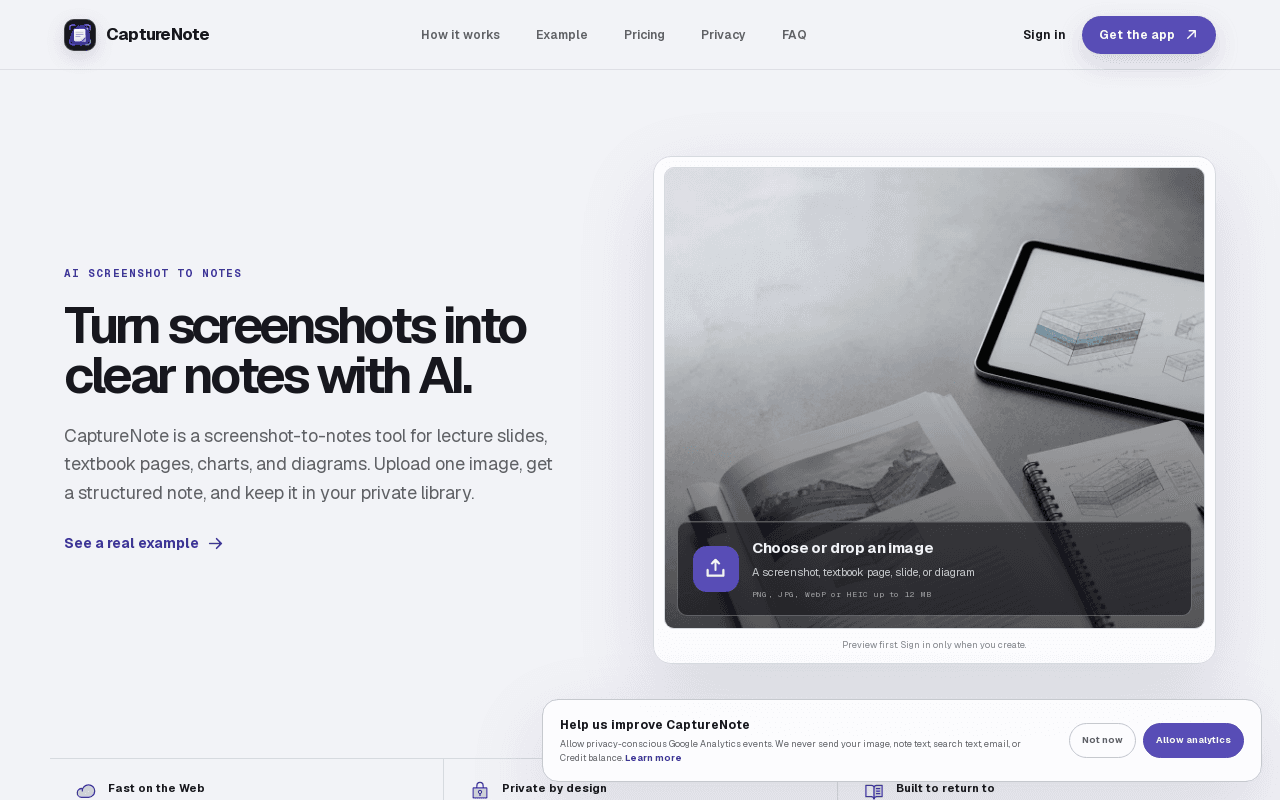
CaptureNote is an AI tool that converts screenshots into structured, searchable notes, extracting and organizing the text and content from a screenshot instead of leaving it as an unsearchable image sitting in a camera roll or downloads folder. It is aimed at people who take a lot of reference screenshots (articles, whiteboards, slides) and want that information to actually be findable and organized later.
Screenshots

Common Use Cases
- Students who screenshot lecture slides, textbook pages, or diagrams and want them turned into reviewable notes instead of sitting unused in a camera roll
Details
- Pricing Model
- Freemium
- Starting Price
- Free (500 credits); Plus from $9.99/mo (10,000 credits/mo) or $79.99/yr (120,000 credits/yr); one-time credit packs from $4.99
- Category
- Productivity & Automation
Frequently Asked Questions
Is CaptureNote free?
CaptureNote offers a free plan, with paid plans starting at Free (500 credits); Plus from $9.99/mo (10,000 credits/mo) or $79.99/yr (120,000 credits/yr); one-time credit packs from $4.99.
Does CaptureNote have an API?
CaptureNote does not currently offer a public API.
Is CaptureNote cloud-based or self-hosted?
CaptureNote is offered as a cloud-based (SaaS) deployment.
What can I use CaptureNote for?
Common uses for CaptureNote include students who screenshot lecture slides, textbook pages, or diagrams and want them turned into reviewable notes instead of sitting unused in a camera roll.
How does CaptureNote compare to iSpring Cloud AI?
CaptureNote and iSpring Cloud AI are both used for productivity & automation. See the full side-by-side comparison for pricing and feature differences.
Key Features
- Screenshot-to-Note ConversionUpload a screenshot, lecture slide, textbook page, chart, or diagram and get a structured note with summary, key points, and terms.
- Multimodal UnderstandingReads text, hierarchy, diagrams, and relationships together rather than doing a flat OCR text dump.
- Private Searchable LibrarySaved notes go into a private, searchable library with folders and editing.
- Markdown ExportNotes can be exported as Markdown.
- Preview Before Sign-InUsers can preview a result before creating an account -- sign-in is only required to actually save a note.
Technical Details
- Deployment
- Cloud
- Free Plan
- Available
Official Pricing
CaptureNote's published plans · verified Sep 26, 2026
Free
$0/mo
- 500 Web Credits to start
Plus Monthly
$9.99/mo/mo
- 10,000 Web Credits added monthly, roll over
Plus Yearly
$79.99/yr/yr
- 120,000 Web Credits added yearly, roll over
Pricing shown above is sourced from CaptureNote's own published plans as of Sep 26, 2026 and can change at any time -- confirm current pricing on CaptureNote's own site before purchasing.
Full CaptureNote pricing breakdown, free plan and cheaper alternatives →
Real Pricing from Verified Users
See what people actually pay for CaptureNote
Reviews
0 reviews
No reviews yet. Be the first to share your experience!
Switching Stories
Real migration experiences with CaptureNote
Discussion
Ask questions, share tips, or discuss this tool with other users.
No discussion yet. Start the conversation!
Similar tools in Productivity & Automation
Other listed tools in Productivity & Automation, not reviewed as direct alternatives

AI-enhanced cloud builder for creating scrollable, web-page-style online courses in minutes
Similar tool in Productivity & Automation
- Scrollable course builder
- AI course generator
- AI assistant
Open-source, private macOS app that turns your permitted activity into a searchable work timeline
Similar tool in Productivity & Automation
- Permission-scoped activity capture
- Hourly and daily summaries
- Local AI agent access

Personalized AI podcast summaries delivered to your inbox
Similar tool in Productivity & Automation
- Personalized summaries
- Contextual intelligence
- Morning briefing
AI-powered PDF and image to LaTeX converter with Overleaf export
Similar tool in Productivity & Automation
- AI PDF and image OCR
- Formula extraction
- Overleaf integration

Online PDF translator that preserves layout across 100+ languages
Similar tool in Productivity & Automation
- Format preservation
- 100+ languages
- OCR for scanned PDFs

One subscription to chat with Claude, ChatGPT, Gemini, Grok and other top AI models in a single place.
Similar tool in Productivity & Automation
- Multi-Model AI Chat
- AI Web Search
- AI Image Editor
People Also Viewed




More in Productivity & Automation

Connect your apps and automate workflows

Customer experience automation

Automate anything without code

Digital analytics platform