
DocsMint
AI-powered document and knowledge workspace for teams and agents.
Data verified Sep 26, 2026
Score
- Price
- Free
Editorial Verdict
AI-researched, not hands-on testedDocsMint is a document workspace built around one specific idea: your team's internal docs should double as a searchable knowledge base that connected AI agents can pull from, rather than sitting in storage that only people read. It fits teams already leaning on AI agents or assistants internally and who want those tools grounded in their own documents instead of generic web knowledge; if you're just looking for a place to write and store docs, a general-purpose editor likely covers you more cheaply. The freemium tier lets you test the agent-integration angle before paying, but with no published feature list, pricing detail, or user feedback available yet, it's hard to judge how deep the agent connectivity actually goes or how it compares to knowledge-base features now being bolted onto tools like Notion and Confluence.
Reviewed by AIToolPundit Editorial Team · last verified September 2026
About DocsMint
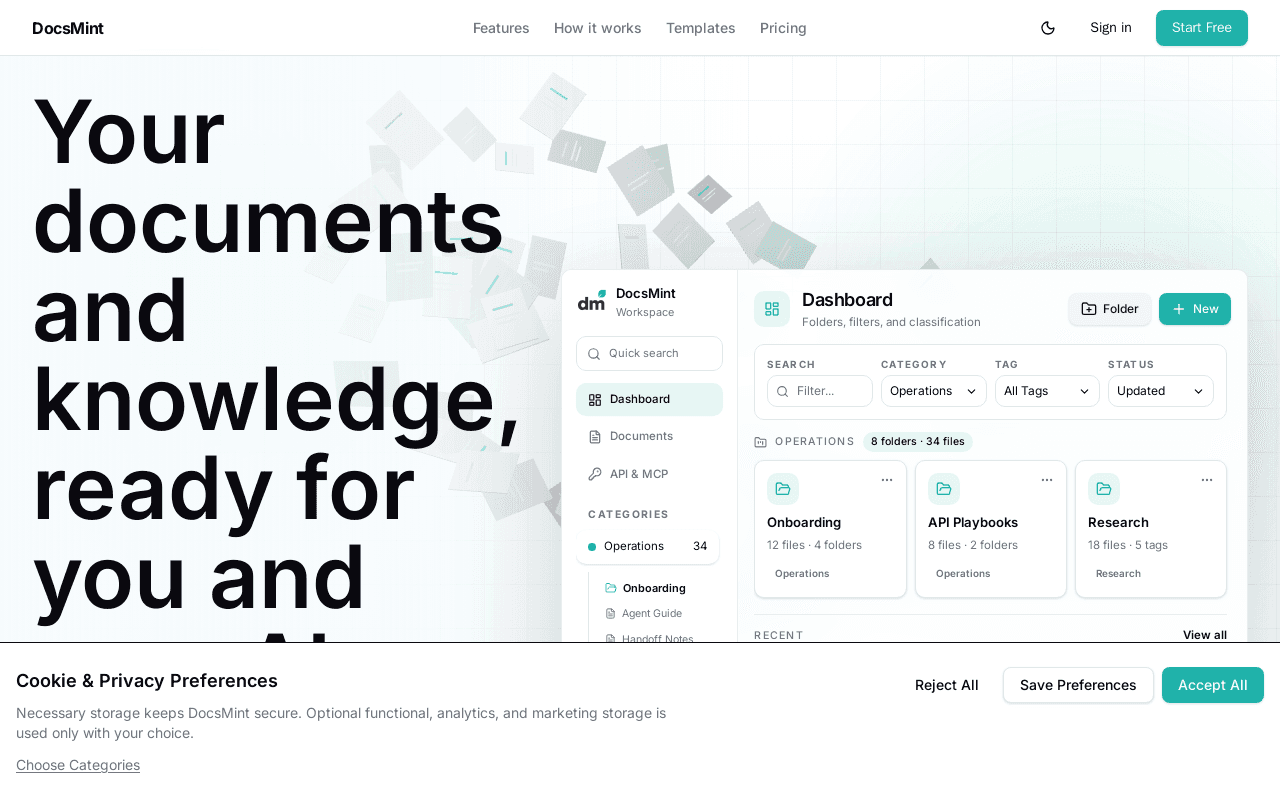
DocsMint is an AI-powered document and knowledge workspace for teams and their AI agents, organizing documents so both humans and connected AI agents can search and reference the same underlying knowledge base. It is aimed at teams that want their internal documents to be genuinely usable as context for AI agents, not just stored files.
Screenshots
Commonly Cited Strengths & Limitations
Strengths
- Free tier includes the core document workspace: editing, organization, search, templates, and sharing
- Also ships as an open-source, self-hostable stack (DocsMint OSS) for teams that want to run it themselves
- MCP access lets AI agents reuse the same organized knowledge base instead of re-deriving context each time
Limitations
- AI editing (translate/rewrite/fix) and MCP/agent access are gated behind paid Pro/Advanced tiers
- Shared workspace capability requires the $29/mo Advanced plan
Details
- Pricing Model
- Freemium
- Starting Price
- Free
- Category
- Productivity & Automation
Frequently Asked Questions
How much does DocsMint cost?
DocsMint starts at Free (Freemium).
Does DocsMint have an API?
Yes, DocsMint provides an API for developers.
Is DocsMint open source?
Yes, DocsMint is open source.
Is DocsMint cloud-based or self-hosted?
DocsMint is offered as a cloud-based (SaaS) deployment.
What are the downsides of DocsMint?
AI editing (translate/rewrite/fix) and MCP/agent access are gated behind paid Pro/Advanced tiers Also, Shared workspace capability requires the $29/mo Advanced plan
How does DocsMint compare to iSpring Cloud AI?
DocsMint and iSpring Cloud AI are both used for productivity & automation. See the full side-by-side comparison for pricing and feature differences.
Key Features
- Document editorFocused visual editor for creating and editing documents.
- Knowledge organizationCategories, nested folders, tags, and flexible document placement to keep notes, research, and decisions findable.
- Workspace searchSearch across accessible documents to return to the right source quickly.
- AI writing toolsPlan-aware AI tools to generate, rewrite, fix, format, and translate document content.
- MCP / API accessAPI and MCP access on higher tiers so AI agents can read and reuse the same workspace knowledge.
- Version historyReview version history and restore an earlier document version.
- Sharing & commentsShare documents with others and collect comments under explicit access rules.
Technical Details
- Deployment
- Cloud
- API
- Available
Official Pricing
DocsMint's published plans · verified Sep 26, 2026
Free
$0/mo
- Core document workspace
- Editing, organization, search, templates, sharing
Pro
$12/mo/mo
- Higher API limits
- AI editing: translate, rewrite, fix workflows
Advanced
$29/mo/mo
- Higher limits than Pro
- Shared workspaces
- Controlled MCP access
Pricing shown above is sourced from DocsMint's own published plans as of Sep 26, 2026 and can change at any time -- confirm current pricing on DocsMint's own site before purchasing.
Full DocsMint pricing breakdown, free plan and cheaper alternatives →
Real Pricing from Verified Users
See what people actually pay for DocsMint
Reviews
0 reviews
No reviews yet. Be the first to share your experience!
Switching Stories
Real migration experiences with DocsMint
Discussion
Ask questions, share tips, or discuss this tool with other users.
No discussion yet. Start the conversation!
Similar tools in Productivity & Automation
Other listed tools in Productivity & Automation, not reviewed as direct alternatives

AI-enhanced cloud builder for creating scrollable, web-page-style online courses in minutes
Similar tool in Productivity & Automation
- Scrollable course builder
- AI course generator
- AI assistant
Open-source, private macOS app that turns your permitted activity into a searchable work timeline
Similar tool in Productivity & Automation
- Permission-scoped activity capture
- Hourly and daily summaries
- Local AI agent access

Personalized AI podcast summaries delivered to your inbox
Similar tool in Productivity & Automation
- Personalized summaries
- Contextual intelligence
- Morning briefing
AI-powered PDF and image to LaTeX converter with Overleaf export
Similar tool in Productivity & Automation
- AI PDF and image OCR
- Formula extraction
- Overleaf integration

Online PDF translator that preserves layout across 100+ languages
Similar tool in Productivity & Automation
- Format preservation
- 100+ languages
- OCR for scanned PDFs

One subscription to chat with Claude, ChatGPT, Gemini, Grok and other top AI models in a single place.
Similar tool in Productivity & Automation
- Multi-Model AI Chat
- AI Web Search
- AI Image Editor
People Also Viewed


More in Productivity & Automation

Connect your apps and automate workflows

Customer experience automation

Automate anything without code

Digital analytics platform